Getting Started
Getting Started
A quick guide to get started with the Pipe Builder plugin.
Installing the Plugin
Download
Download the plugin from the Fab tab in the Epic Games Launcher.
Install
Click Install to engine and select your installed Unreal Engine version.
Open Plugins Window
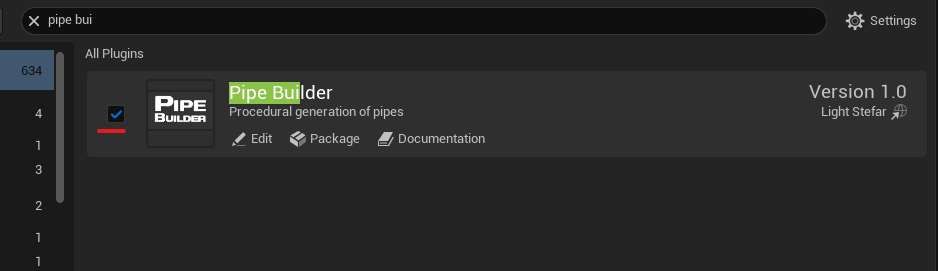
Open your project, go to Edit → Plugins, and find the Fast Powerlines plugin window.
Type
pipe builder in search bar.Enable the Plugin
Enable the plugin by checking its box as shown below.
Quickstart
Navigate to the Plugin Folder
Open the Content Browser and navigate to the Powerlines plugin folder.
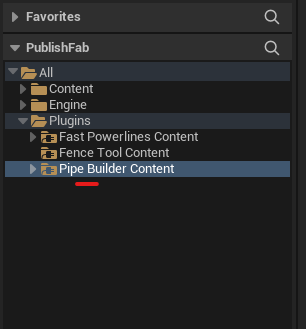
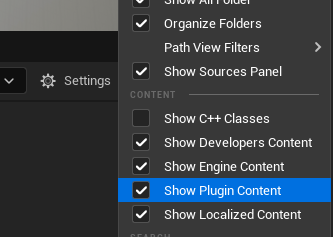
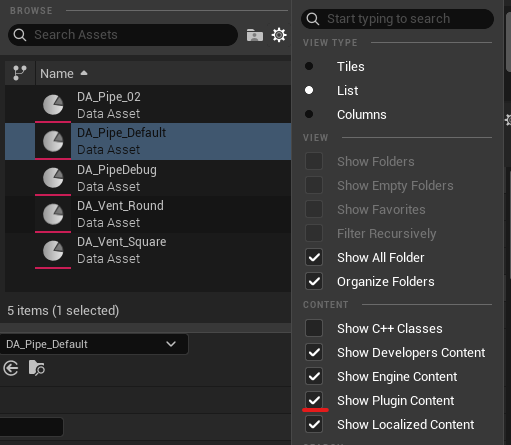
If the plugin folder is not visible, ensure Show Plugin Content is enabled. Click the Settings button in the top-right corner of the Content Browser and check this option.
Add a Powerline Actor to Your Level

Type pipe into the Place Actors search bar and drag the actor from there into level.
Edit the Spline
Add and move spline points to define the path of your powerline.
It’s best to turn on Grid snap in the editor and set it to
50 units.Change Data Asset
Click the Data Asset dropdown button and select a different preset.
If data assets are not visible, ensure Plugin Content is enabled. Click the Settings button on the center-right side of the window and check this option.
Last updated on