Connections
Connection allows you to create a network of connected powerlines or connect cables to any actor that has sockets or bones.
Connection Guide
Add a New Entry
Add a new entry to the connection array and set its Type to Powerline.

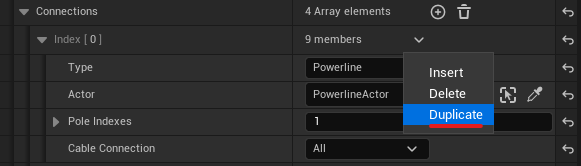
Select an Actor
Select the target actor from the Scene Outliner or by clicking it in the viewport.
Set Pole Indexes
Define the source and target spline points using the Pole Indexes property. X is the source pole index, and Y is the target pole index.

Optional: Configure Cables
For Powerline type connections, you can change the Cable Connection Type from All to Probability to control cable density, or to Manual for precise control.
Connection Properties
Show Text Type
An editor-only visualization that displays spline point or pole index numbers.
- None: Disables the debug text.
- Scaled: Text size scales with the pole’s height and rotates with the pole.
- Static: Text remains a fixed size (100 units) and does not rotate with the spline or pole.
Core Properties
| Variable | Default | Description |
|---|---|---|
| Type | None | Defines the connection target. • None: Disables this connection. • Powerline: Connects to another powerline actor. • Actor: Connects to any actor in the scene. |
| Actor | None | The target actor to connect to. |
| Pole Indexes | (0, 0) | Specifies which poles (spline points) to use for the connection. X is the source index on this actor, Y is the target index on the connected actor. Note: The Y index is ignored when Type is set to Actor. |
Cable Actor Connection Type
Actor Type Only
Chooses how to define connection points on the target actor.
- Points: Uses the Actor Connected Points array.
- Bones: Uses the Actor Connected Bones array (ideal for actors with many sockets).
| Variable | Description |
|---|---|
| Actor Connected Points | Points type only An array specifying connection points. Each entry defines a pair: X (source index on this actor) and Y (target point index on the connected actor). |
| Actor Connected Bones | Bones type only An array specifying connection bones/sockets. Each entry defines a pair: X (source index on this actor) and a target Bone Name on the connected actor. |
Cable Connection Type
Powerline Type Only
Controls how cables are generated between connected powerline poles.
- All: Creates a cable for every possible connection between poles.
- Random: Creates cables randomly based on a probability weight.
- Manual: Lets you explicitly specify which connections to create.
| Variable | Default | Description |
|---|---|---|
| Cable Probability | 50 | Random type only The probability weight (0-100) for creating a cable between a pair of poles. |
| Cable Connected Points | Empty | Manual type only An array where you explicitly list the pole index pairs (X=source, Y=target) to connect with cables. Note: Switching from All or Random will auto-populate this array with the corresponding indexes. |